Classic themes
Activate the plugin once and the button appears on every public page, with no header or footer edits.
Install the free Inclusense plugin from WordPress.org and give visitors controls for contrast, text size, reading support and motion. No theme edits, and it works with Elementor, Divi and WooCommerce.
Check your WordPress site for accessibility issues first.
Free WCAG check on up to 5 pages, no account needed.
16
Visitor tools
~1 min
To install and activate
WP 5.6+
Works on
Overview
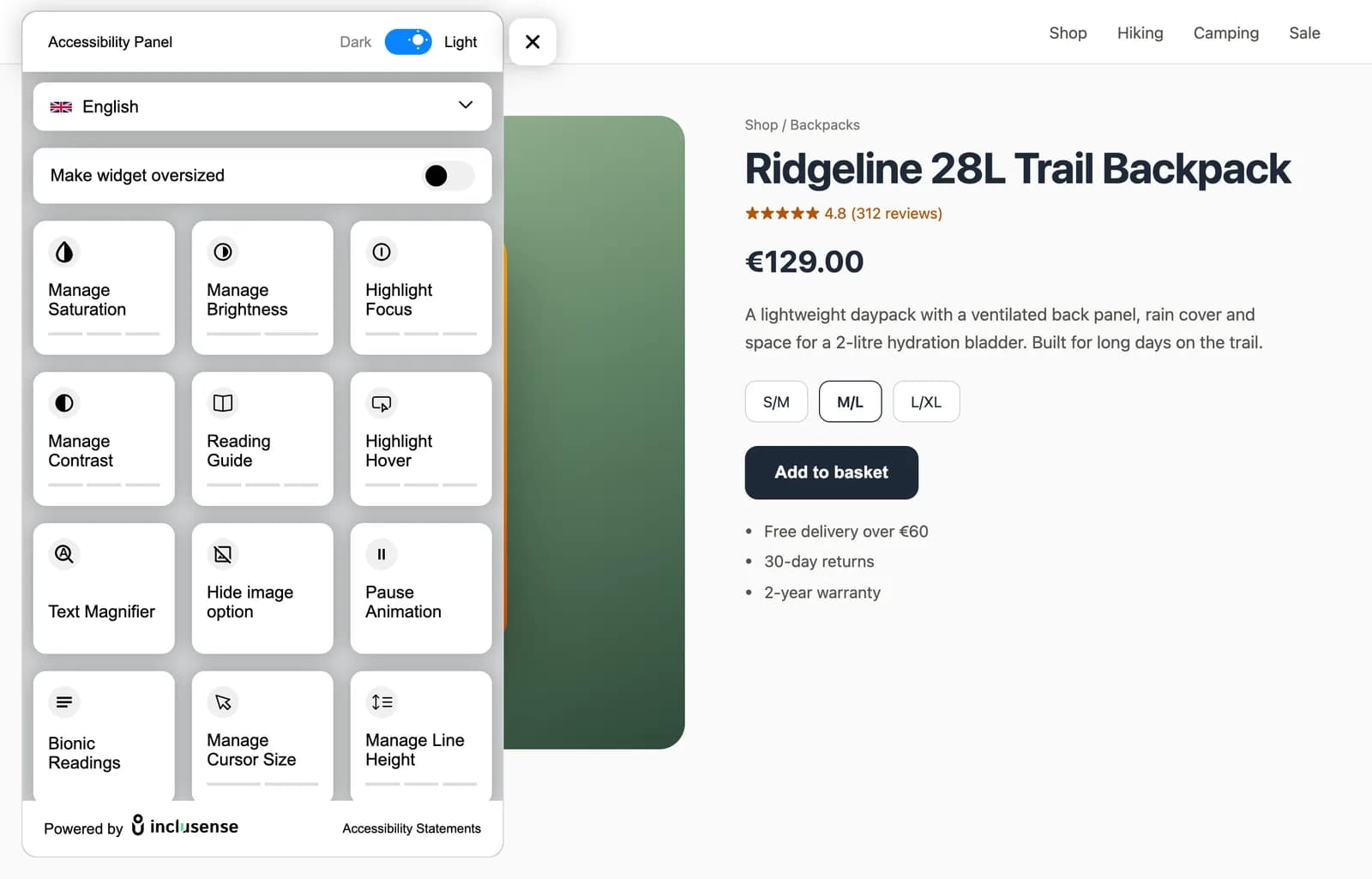
A WordPress accessibility plugin adds a small accessibility button to every page of your site. Visitors open it to raise contrast, enlarge text, add a reading guide, pause animations or have the page read aloud.
The Inclusense plugin loads that widget for you. You install it like any other plugin, connect your site to a free Inclusense account, and manage every setting from the Inclusense dashboard instead of your theme.
Not on WordPress? The same accessibility widget works on any website with one line of code.
Page preview
The embed does not change your stack — it adds the same panel customers configure in the dashboard.
Launcher ready
A small button sits on every page of your site.
Installation
Four steps, about two minutes, no theme edits.
In WordPress, go to Plugins → Add New, search for “Inclusense Accessibility Widget”, then click Install and Activate.
Sign up at Inclusense and add your website's domain. The Free plan covers sites with up to 10,000 monthly page views.
In the Inclusense dashboard, turn tools on or off and set the launcher style. Changes apply without updating WordPress.
Open your site in a private window and look for the accessibility button. Run a free scan to see what to fix in your theme.
Features
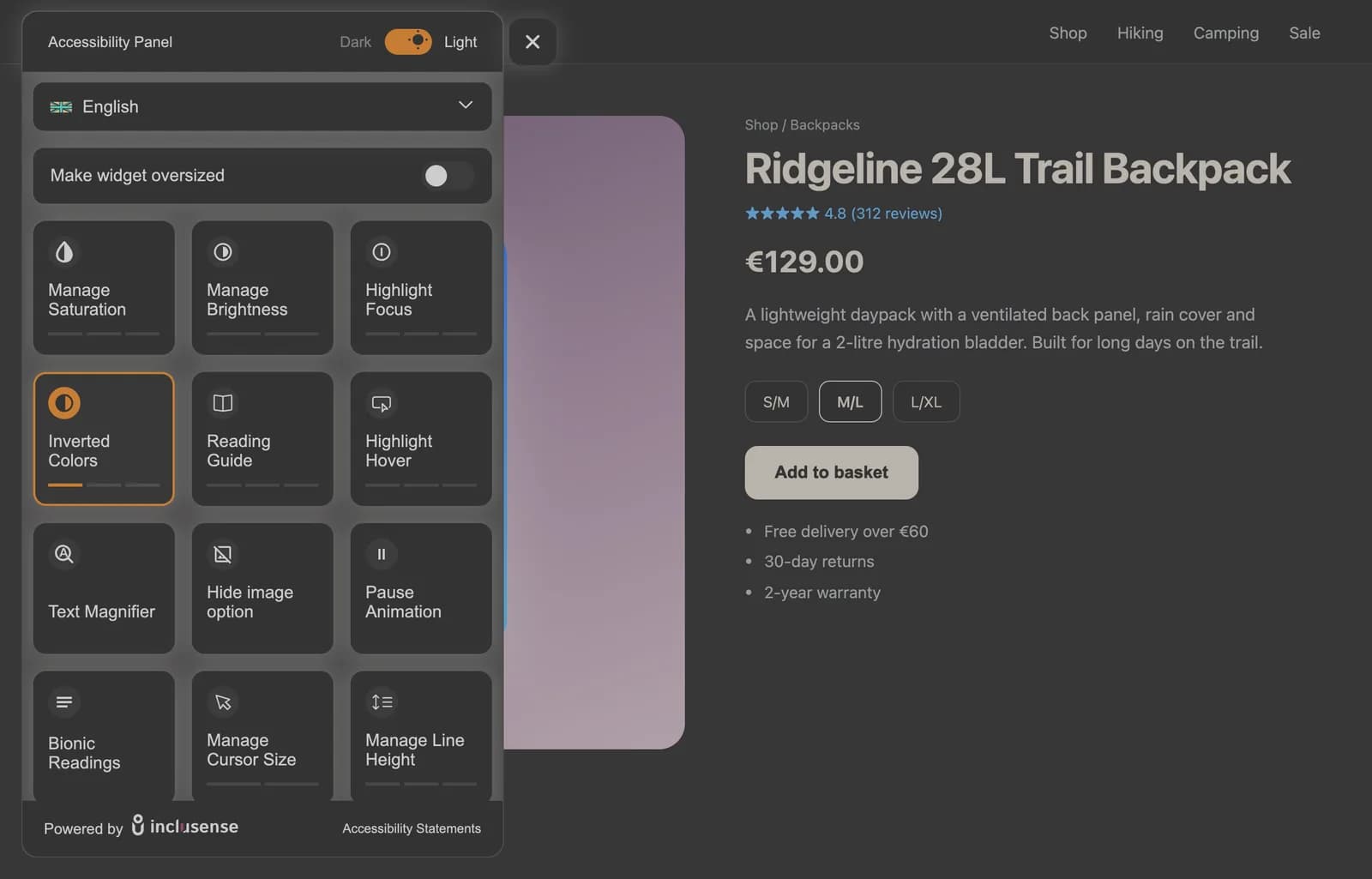
16 tools plus a language selector. Turn each one on or off in your dashboard.
Buyer's guide
“Accessibility plugin” covers four different kinds of tool. Here is what each does.
| Type | What it does | Inclusense? |
|---|---|---|
| Accessibility toolbar or widget | Adds a button that lets each visitor adjust contrast, text, spacing and motion | Yes, this is the Inclusense plugin |
| Accessibility checker | Scans posts and pages for WCAG issues such as missing alt text or low contrast | Yes, through Inclusense scans (outside WordPress) |
| Code-fixing plugin | Adds skip links, fixes focus outlines or removes title attributes in your theme | No, fix these in your theme or with a dedicated plugin |
| Accessibility-ready theme | A theme built and reviewed for keyboard use, contrast and structure | No, choose this when you pick or rebuild your theme |
01Know which type you need. A toolbar helps visitors now; a checker shows what to fix; a code-fixing plugin or better theme fixes it. Most sites need more than one.
02Test the tools yourself. Open the panel on a live site. Each tool should visibly change the page, on desktop and on mobile.
03Avoid compliance promises. No plugin makes a WordPress site ADA or WCAG compliant on its own. Be wary of any that claim to.
04Check it fits your stack. It should work with your theme, page builder and WooCommerce without editing templates.
05Look at the real cost. Many plugins are free to install but need a paid account. Check what the free plan includes.
Plans
The plugin is free on WordPress.org. The Free plan runs the widget on sites with up to 10,000 monthly page views. Each paid plan can be tried free for 14 days.
| Plan | Monthly views | Tools | Customise | Languages | Branding |
|---|---|---|---|---|---|
| Free$0/mo | Up to 10K | 6 core tools | English | Inclusense badge | |
| Starter$19/mo | Up to 50K | 11 tools | Multi-language | Inclusense badge | |
| Silver$49/mo | Up to 100K | All 16 tools | Multi-language + auto-detect | Remove badge, add your logo | |
| Gold$69/mo | Up to 1M | All 16 tools | Multi-language + auto-detect | Remove badge, add your logo |
Over 1M monthly views? See Platinum and yearly billing on the pricing page.
Compatibility
Activate the plugin once and the button appears on every public page, with no header or footer edits.
The widget loads site-wide, so it stays consistent across block templates and full-site editing layouts.
The widget runs independently of page-builder markup, so it works whichever editor built the page.
Shoppers can enlarge product text and raise contrast through checkout. Match the launcher to your store's colours.
Setup options
Both load the same widget. The plugin is the easier choice for most sites.
| Aspect | WordPress plugin | Embed script |
|---|---|---|
| How you add it | Install from WordPress.org, then activate | Paste one script into your theme header or footer |
| Theme edits | None | One line in your theme or a code-snippets plugin |
| Survives theme changes | Yes | Only if you add the script again |
| Best for | Most WordPress sites | Sites that avoid extra plugins, or headless WordPress |
Honest limits
Not on its own. Here is what an accessibility plugin can and cannot do.
For the legal background, see the ADA compliance widget and EAA compliance widget guides.
FAQ
Yes. The Inclusense Accessibility Widget plugin is free on WordPress.org, and the Inclusense Free plan runs the widget at no cost on sites with up to 10,000 monthly page views. Paid plans add more tools, languages and branding options.
Start with an accessibility plugin so visitors can adjust the page, then scan your site for WCAG issues and fix them: add alt text, label forms, use proper headings and check colour contrast. An accessibility-ready theme makes the fixes easier.
In WordPress, go to Plugins → Add New, search for “Inclusense Accessibility Widget”, then install and activate it. Create a free Inclusense account, add your domain and the widget appears on your site. You can manage tools and styling from the Inclusense dashboard.
No plugin can do that on its own. A plugin helps visitors adjust the page, but ADA and WCAG conformance also depends on your theme's code and your content. Use the plugin with a WCAG scan and code fixes. This is not legal advice.
Yes. The widget loads independently of your theme and page builder, so it works with classic and block themes, Elementor, Divi, Gutenberg and WooCommerce.
No. Activate the plugin and manage everything from the Inclusense dashboard. If you prefer not to use a plugin, you can paste the embed script into your theme instead.
The plugin needs WordPress 5.6 or newer and PHP 7.4 or newer.
Last updated:
Free plugin, free plan for sites with up to 10,000 monthly page views. No card needed.